Search is a small, fast, quiet browser for the Mac.
Built on the WebKit already in macOS, so it’s 15 MB and rests at 42 MB of memory. Free and open source.
Version 1.0.22 · 14.9 MB · macOS 14 or later

Built in, so there is
nothing to install.
What Search does from the first launch, with its own UI.
-
 A column that folds1/6
Fold the column to its icons with ⌘S.
-
 Split View2/6
Two or more pages side by side, ⌥⌘N.
-
 Reading mode3/6
Just the article, ⇧⌘R.
-
 Ads blocked4/6
Ads stopped before the page loads.
-
 Hide anything5/6
Click a box away for good, ⇧⌘H.
-
 Chrome extensions6/6
From the Chrome Web Store, macOS 15.4+.
And the rest of the day.
Six more, then every other feature.
- Peek at a linkOpen a link in a panel over the page
- Pin foldersGroup your pins
- Tab groupsNamed groups of tabs, folded or open
- Live foldersA pin folder filled from a site’s feed
- A site’s own MarkdownReading mode can read it
- Capture pagesKeep a picture of a page
- Page zoomPer site, remembered
- Translate pagesInto your language, always for the ones you pick
- Site shortcutsType a keyword to search a site
- Address bar commandsDo things from the address field
- Your search engineAny engine, with its suggestions
- Tabs on the side or on top⇧⌘S switches
- GlassA translucent window
- Counts on pinsUnread counts as a badge
- A wall for new tabsA painting, a colour or your own picture
- Darken pages that stay lightIn dark mode
- Keep a site awakeNever put to sleep
- Close tabs you leave aloneAfter a while you choose
- ⌘Z reopens a closed tabAs in a text editor
- Private tabsTheir own cookies; nothing left behind
- Passwords in your keychainOffered, never filled on their own
- Apple PasswordsIts accounts and codes under the field
- Touch ID before fillingIf you want it
- Try HTTPS firstFor addresses typed without it
- Prevent cross-site trackingWebKit’s own protection
- Bring things overFrom Chrome, Arc, Dia, Brave, Edge, Firefox, Zen
- Sync Macs through a folderiCloud Drive or Dropbox
- HandoffThe page on your iPhone, on your Mac
- Bookmarks barOr in the sidebar
- HistorySearchable, on your Mac only
- DownloadsA panel, a keystroke away
- Find on page⌘F
- Links in a small windowFrom other apps, if you like
- Swipe back closes a tabOne a link opened
- Hold a swipe for historyPick where to go back to
- Web InspectorWebKit’s own tools
- Let coding agents use SearchFor developers, in Settings
- Updates itselfChecked and signed by Office Commun
- Homebrewbrew install --cask driceroland/tap/search
- Light and darkOr whatever the Mac is doing
- Sync with iCloudTabs, pins, spaces, bookmarks, end to end encrypted

The window bends to how you work, not the other way round.
 G
 F
 N
 TTypography
 AAre.naFFigma
 LLinear
 NNetflix
 AApple
 XXMMonet
 DDribbble
 VVercel
 SStripe
 SShopifyGFNTAFLNAXMDVSSTTypographyAAre.naFFigmaNNetflixAAppleXXDDribbbleVVercelSStripe
Nineteen tabs asleep. 88% lighter.
A tab you haven't looked at for half an hour gives its page back and keeps its place. Twenty heavy pages: 3.4 GB loaded, 0.4 GB with nineteen asleep, the tab on screen included. Pick one and it's back in a fifth of a second.
How it was measured
Leave the tab. The video follows.
Leave a tab that's playing a video and it keeps playing in a small window, above every app. Skip, pause, or send it back to its tab with a click. ⇧⌘P floats it whenever you like.
Your Mac's tabs, in your pocket.
The address in one pill at the bottom, every tab in one sheet, and your Mac's pins and tabs through your own iCloud, end to end encrypted. Free on TestFlight, for iOS 18 or later.
See Search for iPhone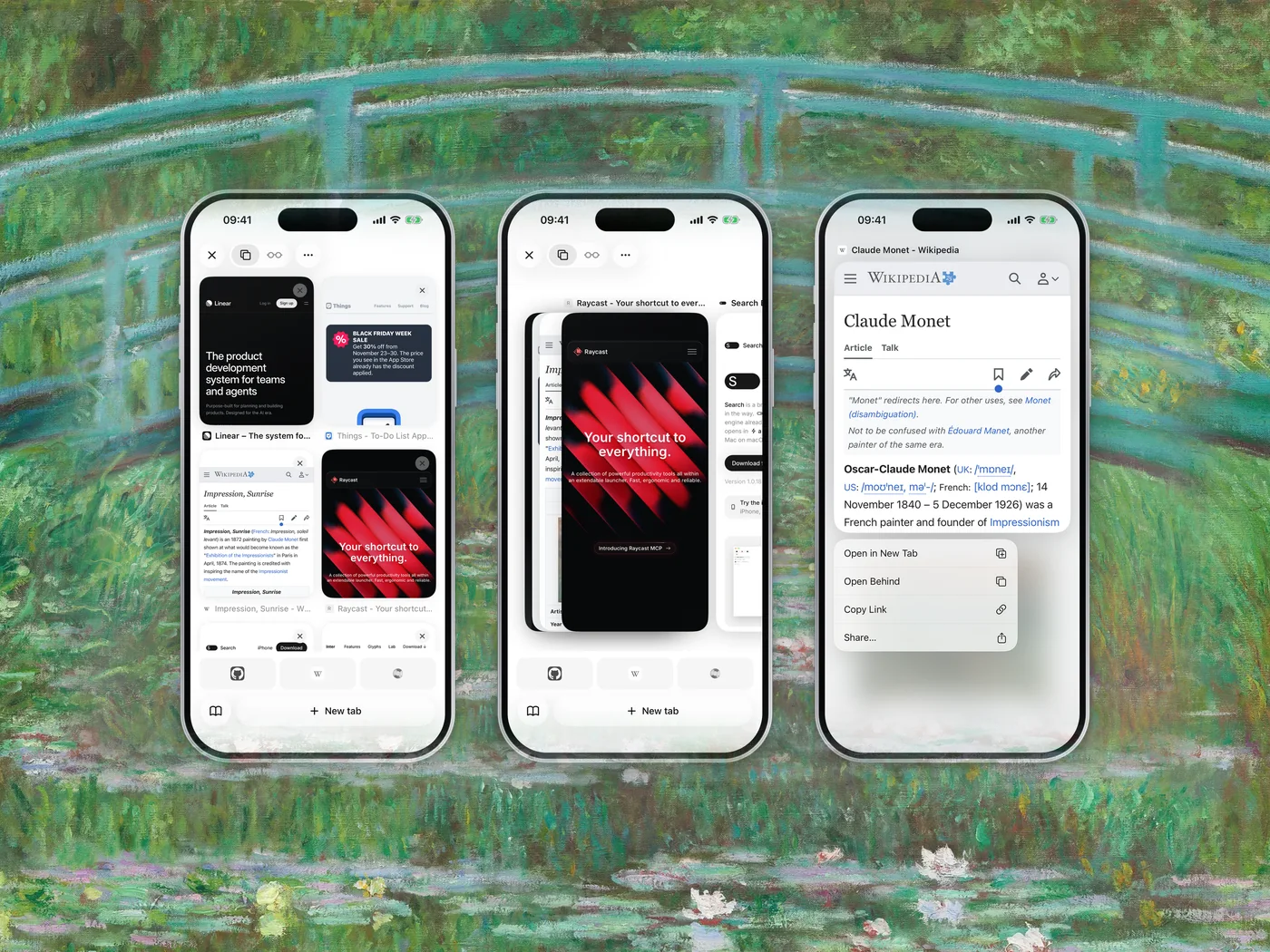
The browsers people weigh on a Mac, point by point.

Weighed on the same Mac. Shorter is lighter.
25–27 Nov 2026 · M3 Pro, macOS 26.6.2 · fresh profile, no site open · memory 30 s after launch · median of three runs · Method
Memory at rest, no site open
Processes at rest
The app on disk
Open source, under the MIT licence.
Every line of Search is on GitHub: read it, file an issue or send a pull request. Twenty-two releases since 23 September, each saying what changed.
Latest releases
- 1.0.2227 NovA pinned square whose page plays sound wears a small speaker in its bottom corner17 new · 63 fixed
- 1.0.2125 NovBackspace goes back3 new · 30 fixed
- 1.0.2024 NovKeep the window when its last tab closes16 new · 32 fixed
- 1.0.1923 NovShow counts on pins21 new · 58 fixed